---
title: Response Drivers – Advice and Templates
description: Discover how to use Drivers in feedback to uncover true customer satisfaction in products, service, and more.
---
[Skip to content](https://support.customerthermometer.com/knowledge/response-drivers-advice-and-templates#main-content)
English
Show submenu for translations
[Contact the Ministry of Magic](https://support.customerthermometer.com/knowledge/kb-tickets/new)
[](https://www.customerthermometer.com/)
- [App link](https://app.customerthermometer.com/)
- [Survey tips & advice](https://www.customerthermometer.com/resources/how-to-embed-customer-thermometer-into-your-business/)
- [System status](https://status.customerthermometer.com/)
Open main navigation
Close main navigation
- [App link](https://app.customerthermometer.com/)
- [Survey tips & advice](https://www.customerthermometer.com/resources/how-to-embed-customer-thermometer-into-your-business/)
- [System status](https://status.customerthermometer.com/)
- English
Show submenu for translations
- [Contact the Ministry of Magic](https://support.customerthermometer.com/knowledge/kb-tickets/new)
How can we help you?
- There are no suggestions because the search field is empty.
1. [Brilliant help, moments away.](https://support.customerthermometer.com/knowledge)
2. [Reporting and Alerts](https://support.customerthermometer.com/knowledge/reporting-and-alerts)
3. [Response Drivers](https://support.customerthermometer.com/knowledge/reporting-and-alerts#response-drivers)
August 10, 2025
# Response Drivers – Advice and Templates
Below are ideas and advice on how to use Drivers in four classic feedback scenarios.
These will help you create your own Drivers relevant to your business, so you can start digging into the true Drivers of satisfaction, and dissatisfaction, in your business.
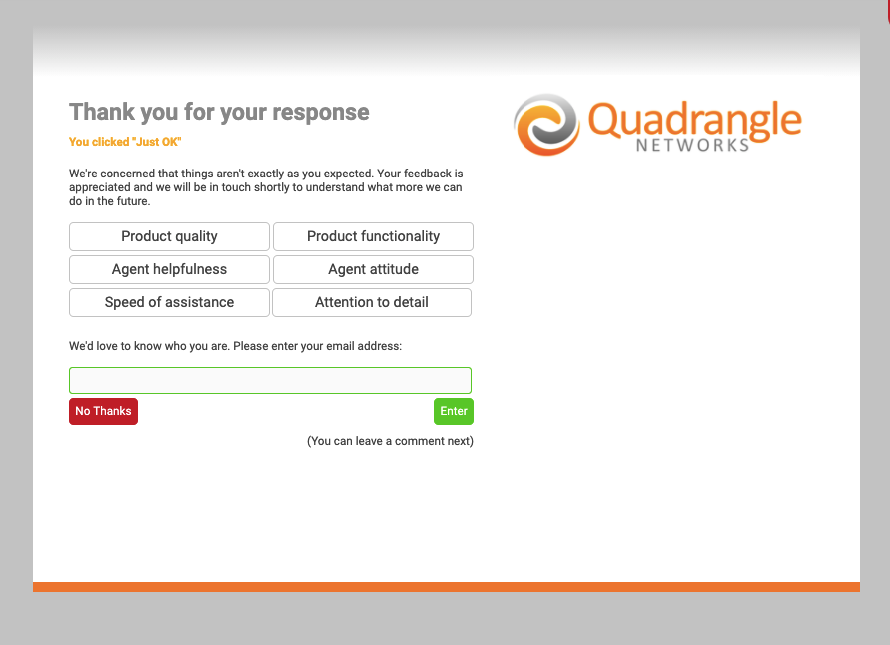
An ongoing issue for many Service Desks, for example, is that customers will rate the product they have received, or are returning, rather than the service from the agent – which is often what many Service Desk heads are most interested in. Drivers allow you to offer “Product quality” as a Driver, so you can separate out these responses from the overall Service Desk feedback.
So, without further ado, on to the four scenarios. These are; to get more insight into what’s driving Product satisfaction, Service Desk satisfaction, Employee engagement and Brand experience.
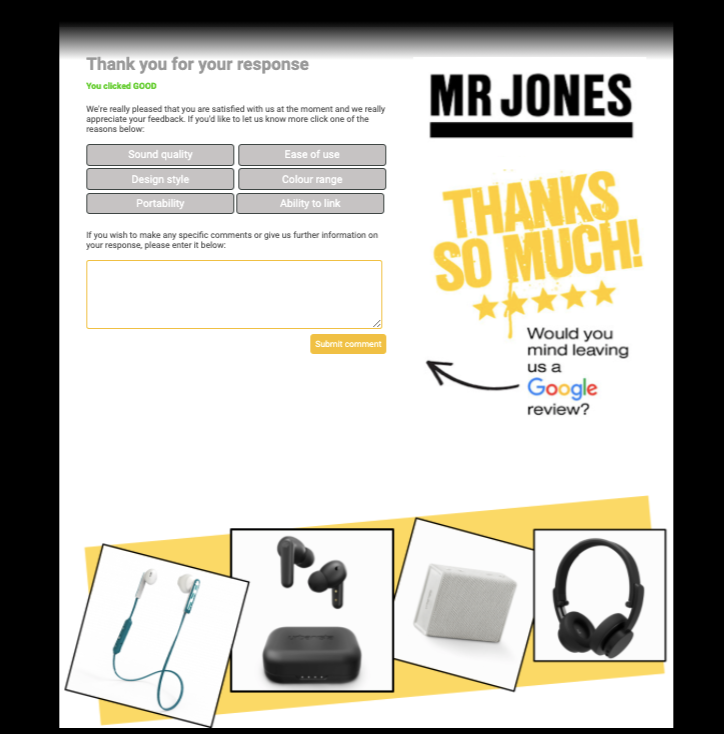
### **Product-focused Drivers**
Why did you select that particular option today?
- Sound quality
- Ease of use
- Design style
- Colour range
- Portability
- Ability to link
### **Service-desk focused Drivers**
Which aspect of our service drove your choice?
- Product quality
- Attention to detail
- Agent helpfulness
- Agent attitude
- Product functionality
- Speed of assistance
### **Employee engagement Drivers**
Why are you feeling that way at the moment?
- Management style
- Communication frequency
- Communication clarity
- Work/life balance
- Workload
- Atmosphere
- Opportunity to progress
- Training

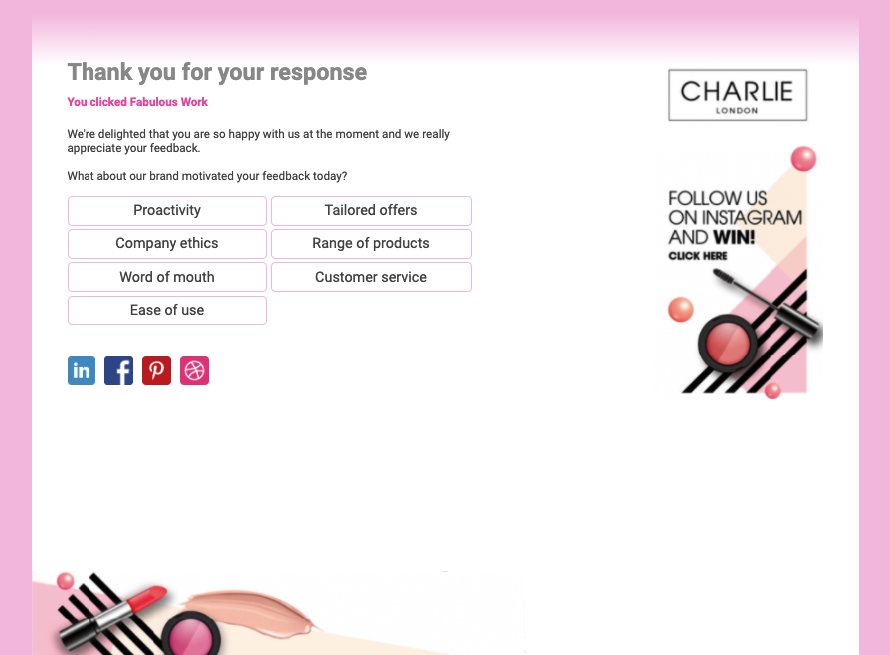
### **Brand Experience focused Drivers**
What about our brand motivated your feedback today?
- Proactivity
- Tailored offers
- Company ethics
- Range of products
- Word of mouth
- Customer service
- Ease of use
### **Top tips**
- Remember you can have different Drivers for different CSAT types. So the Drivers you offer for red/unhappy responders can be different from those you offer green/happy responders. If you want to use the same Drivers across all possible response types, remember to keep them neutral. So instead of saying “poor quality” or “good quality”, say simply “quality”.
- You are able to add in the text above the Drivers area – so basically the Drivers question – freehand. It’s worth keeping this punchy and also making clear you’re asking them why. So we’d suggest a question such as “Why do you feel like that?” or “Why did you choose that rating?” or “What aspect of our service most drove your feedback today?
- Start simple so you can actively use the Drivers information you have to make changes on the ground for customers. Once you understand more about the basic Drivers, you can add more sophistication
- If you are still struggling for somewhere to start, and you’ve been using Customer Thermometer for a while, take a look at your comment word cloud in your “Reporting” section, under the “Comments” tab. You might see some often-repeated words and concepts in that section that you can turn into options for your Drivers.
- [Integrations](https://support.customerthermometer.com/knowledge/integrations#main-content)
- [Don't see your integration? Use our Universal Thermometer](https://support.customerthermometer.com/knowledge/integrations#dont-see-your-integration-use-our-universal-thermometer)
- [Accelo](https://support.customerthermometer.com/knowledge/integrations#accelo)
- [ActiveCampaign](https://support.customerthermometer.com/knowledge/integrations#activecampaign)
- [Administrate](https://support.customerthermometer.com/knowledge/integrations#administrate)
- [Appboy](https://support.customerthermometer.com/knowledge/integrations#appboy)
- [Atera](https://support.customerthermometer.com/knowledge/integrations#atera)
- [AutoTask](https://support.customerthermometer.com/knowledge/integrations#autotask)
- [Aweber](https://support.customerthermometer.com/knowledge/integrations#aweber)
- [BetterCloud](https://support.customerthermometer.com/knowledge/integrations#bettercloud)
- [Braze](https://support.customerthermometer.com/knowledge/integrations#braze)
- [BrightGauge](https://support.customerthermometer.com/knowledge/integrations#brightgauge)
- [CodeTwo](https://support.customerthermometer.com/knowledge/integrations#codetwo)
- [ConnectWise](https://support.customerthermometer.com/knowledge/integrations#connectwise)
- [ConstantContact](https://support.customerthermometer.com/knowledge/integrations#constantcontact)
- [Exclaimer](https://support.customerthermometer.com/knowledge/integrations#exclaimer)
- [Freshdesk](https://support.customerthermometer.com/knowledge/integrations#freshdesk)
- [GetResponse](https://support.customerthermometer.com/knowledge/integrations#getresponse)
- [Gorgias](https://support.customerthermometer.com/knowledge/integrations#gorgias)
- [Halo PSA](https://support.customerthermometer.com/knowledge/integrations#halo-psa)
- [HappyFox](https://support.customerthermometer.com/knowledge/integrations#happyfox)
- [Hubspot](https://support.customerthermometer.com/knowledge/integrations#hubspot)
- [Infusionsoft](https://support.customerthermometer.com/knowledge/integrations#infusionsoft)
- [Intercom.io](https://support.customerthermometer.com/knowledge/integrations#intercom-io)
- [Jira](https://support.customerthermometer.com/knowledge/integrations#jira)
- [Kaseya](https://support.customerthermometer.com/knowledge/integrations#kaseya)
- [Kayako](https://support.customerthermometer.com/knowledge/integrations#kayako)
- [Klaviyo](https://support.customerthermometer.com/knowledge/integrations#klaviyo)
- [Kustomer CRM](https://support.customerthermometer.com/knowledge/integrations#kustomer-crm)
- [LanDesk](https://support.customerthermometer.com/knowledge/integrations#landesk)
- [LiveAgent](https://support.customerthermometer.com/knowledge/integrations#liveagent)
- [Mac](https://support.customerthermometer.com/knowledge/integrations#mac)
- [MailChimp](https://support.customerthermometer.com/knowledge/integrations#mailchimp)
- [ManageEngine](https://support.customerthermometer.com/knowledge/integrations#manageengine)
- [Microsoft](https://support.customerthermometer.com/knowledge/integrations#microsoft)
- [N-able](https://support.customerthermometer.com/knowledge/integrations#n-able)
- [NetHelpDesk](https://support.customerthermometer.com/knowledge/integrations#nethelpdesk)
- [NetSuite](https://support.customerthermometer.com/knowledge/integrations#netsuite)
- [Oracle](https://support.customerthermometer.com/knowledge/integrations#oracle)
- [OTRS](https://support.customerthermometer.com/knowledge/integrations#otrs)
- [Pulseway PSA](https://support.customerthermometer.com/knowledge/integrations#pulseway-psa)
- [RegOnline](https://support.customerthermometer.com/knowledge/integrations#regonline)
- [Salesforce](https://support.customerthermometer.com/knowledge/integrations#salesforce)
- [Sendinblue](https://support.customerthermometer.com/knowledge/integrations#sendinblue)
- [ServiceNow](https://support.customerthermometer.com/knowledge/integrations#servicenow)
- [Shopify](https://support.customerthermometer.com/knowledge/integrations#shopify)
- [Sirportly](https://support.customerthermometer.com/knowledge/integrations#sirportly)
- [Slack](https://support.customerthermometer.com/knowledge/integrations#slack)
- [Spiceworks](https://support.customerthermometer.com/knowledge/integrations#spiceworks)
- [Splash](https://support.customerthermometer.com/knowledge/integrations#splash)
- [Syncro MSP](https://support.customerthermometer.com/knowledge/integrations#syncro-msp)
- [Team Support](https://support.customerthermometer.com/knowledge/integrations#team-support)
- [Tigerpaw](https://support.customerthermometer.com/knowledge/integrations#tigerpaw)
- [Vorex](https://support.customerthermometer.com/knowledge/integrations#vorex)
- [Zendesk](https://support.customerthermometer.com/knowledge/integrations#zendesk)
- [Zoho](https://support.customerthermometer.com/knowledge/integrations#zoho)
- [Outlook / Gmail Signatures / Outlook 365 add-in](https://support.customerthermometer.com/knowledge/outlook-gmail-signatures-outlook-365-add-in#main-content)
- [Guides](https://support.customerthermometer.com/knowledge/outlook-gmail-signatures-outlook-365-add-in#guides)
- [Outlook 365 add-in](https://support.customerthermometer.com/knowledge/outlook-gmail-signatures-outlook-365-add-in#outlook-365-add-in)
- [Comparisons](https://support.customerthermometer.com/knowledge/outlook-gmail-signatures-outlook-365-add-in#comparisons)
- [Embedded Thermometers](https://support.customerthermometer.com/knowledge/embedded-thermometers#main-content)
- [Custom fields & data](https://support.customerthermometer.com/knowledge/embedded-thermometers#custom-fields-data)
- [Customization](https://support.customerthermometer.com/knowledge/embedded-thermometers#customization)
- [Email Thermometers](https://support.customerthermometer.com/knowledge/email-thermometers#main-content)
- [Required steps](https://support.customerthermometer.com/knowledge/email-thermometers#required-steps)
- [Custom fields & data](https://support.customerthermometer.com/knowledge/email-thermometers#custom-fields-data)
- [Customization](https://support.customerthermometer.com/knowledge/email-thermometers#customization)
- [Reporting and Alerts](https://support.customerthermometer.com/knowledge/reporting-and-alerts#main-content)
- [Reports](https://support.customerthermometer.com/knowledge/reporting-and-alerts#reports)
- [Response Drivers](https://support.customerthermometer.com/knowledge/reporting-and-alerts#response-drivers)
- [Calculations](https://support.customerthermometer.com/knowledge/reporting-and-alerts#calculations)
- [Alerting](https://support.customerthermometer.com/knowledge/reporting-and-alerts#alerting)
- [Management](https://support.customerthermometer.com/knowledge/reporting-and-alerts#management)
- [Net Promoter Score (NPS)](https://support.customerthermometer.com/knowledge/net-promoter-score-nps)
- [Troubleshooting](https://support.customerthermometer.com/knowledge/troubleshooting#main-content)
- [Reporting Troubleshooting](https://support.customerthermometer.com/knowledge/troubleshooting#reporting-troubleshooting)
- [Duplicate Feedback/Responses Troubleshooting](https://support.customerthermometer.com/knowledge/troubleshooting#duplicate-feedback-responses-troubleshooting)
- [Thermometer Builder Troubleshooting](https://support.customerthermometer.com/knowledge/troubleshooting#thermometer-builder-troubleshooting)
- [Email Thermometer Troubleshooting](https://support.customerthermometer.com/knowledge/troubleshooting#email-thermometer-troubleshooting)
- [Advanced](https://support.customerthermometer.com/knowledge/advanced#main-content)
- [Responses, Duplicates & False Clicks](https://support.customerthermometer.com/knowledge/advanced#responses-duplicates-false-clicks)
- [Outputs & APIs](https://support.customerthermometer.com/knowledge/advanced#outputs-apis)
- [Tablets](https://support.customerthermometer.com/knowledge/advanced#tablets)
- [Customization](https://support.customerthermometer.com/knowledge/advanced#customization)
- [Account Admin](https://support.customerthermometer.com/knowledge/account-admin#main-content)
- [Users & Security](https://support.customerthermometer.com/knowledge/account-admin#users-security)
- [Account Management & Billing](https://support.customerthermometer.com/knowledge/account-admin#account-management-billing)
[](https://www.customerthermometer.com)
Copyright © 2026, Customer Thermometer Technology Ltd - THE customer satisfaction survey